How to convert PDF to CSV online for free (clean table extraction)
Quick summary
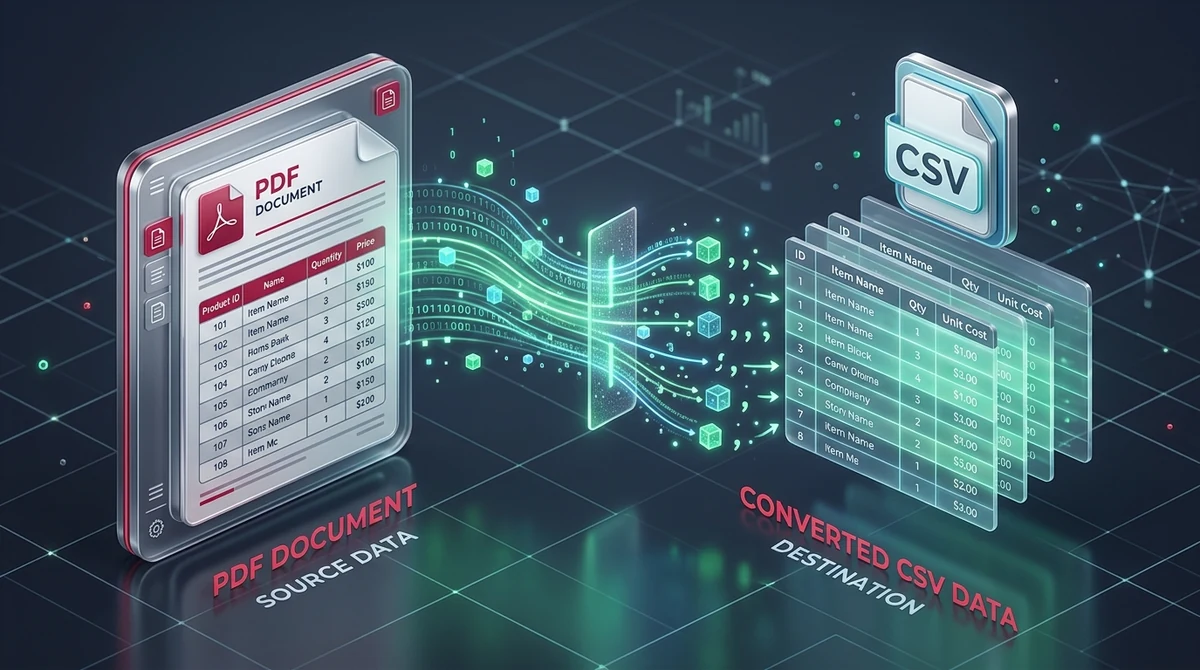
To convert a PDF table into a clean CSV file online for free, upload your document to AZ2PDF PDF to CSV. The extraction engine uses spatial lattice and stream parsing to isolate table boundaries, group characters into correct columns, escape delimiters under RFC 4180 standards, and process files entirely in temporary RAM with zero data logging.
- Accurate column alignment: Employs geometric coordinate parsing to group text into clean rows and vertical columns, preventing merged values or misaligned cells.
- Database and code ready: Produces clean RFC 4180 comma-separated values in standard UTF-8 text, ideal for SQL database ingestion, Python pandas scripts, and accounting software.
- 100 percent free with no watermarks: Enjoy unlimited tabular conversions with zero fees, no subscription traps, no account signups, and no advertising stamps on your files.
- Strict financial privacy: Files are processed strictly inside volatile in-memory buffers and wiped permanently within 5 minutes by an automated background purge daemon.
Why copying table data directly from a PDF fails
Anyone who has ever managed a monthly budget, audited expense receipts, or migrated inventory lists has encountered this frustrating roadblock: you open a PDF document containing a clean, beautiful data table, highlight the rows with your mouse, copy the selection, and paste it into Excel or a database client. Instead of a tidy grid of rows and columns, the result is complete chaos.
All values from four distinct columns collapse into a single text column. Price numbers crash into address fields, dates split into disconnected pieces, and multi-line descriptions create phantom empty rows. If you attempt to use automated spreadsheet parsing or import the text into a SQL table, the import script errors out immediately due to irregular field counts.
The root cause lies in how the Portable Document Format (PDF) was architected under the international ISO 32000 standard. Unlike spreadsheets or HTML web pages that store structured information in explicit row and column hierarchies, a PDF is essentially a vector drawing instructions canvas. A PDF file does not store a concept of a table cell. Instead, it positions text fragments at absolute two-dimensional coordinates across a Cartesian plane measured in typographic points (1/72 of an inch), starting from the bottom-left corner of the page.
Extract raw financial ledgers, transactional logs, and tabular data instantly using the AZ2PDF PDF to CSV converter. It isolates cell delimiters and outputs RFC-compliant CSV files ready for database and machine learning ingestion.
How spatial table extraction works under the hood
Converting coordinate-based document text into structured tabular output is one of the most sophisticated challenges in document engineering. To generate clean, import-ready Comma-Separated Values (CSV) under the RFC 4180 specification, a dedicated converter executes a multi-stage algorithmic pipeline.
1. Bounding box and coordinate extraction
The parser begins by inspecting the low-level content stream of each PDF page. It extracts every individual text character along with its exact typographic coordinates: horizontal position (x), vertical position (y), width, height, and font metrics. Rather than treating the page as a single blob of text, the engine maps each character into a geometric coordinate cloud.
2. Lattice detection for ruled tables with lines
When a document contains visible grid lines, such as commercial invoices or printed financial balance sheets, the engine activates a lattice parsing algorithm. It scans vector drawing paths, identifying horizontal lines and vertical rulings defined by PDF path operators. By calculating the intersections of these vector lines, the parser constructs a rigid geometric grid of cells, assigning character clouds to specific row and column buckets with mathematical precision.
3. Stream detection for unruled tables
Many modern financial records, banking statements, and ERP reports do not use visual grid lines. Instead, they separate data using white space margins. In these scenarios, the engine switches to a stream parsing algorithm. It clusters text elements sharing identical or near-identical vertical coordinates into rows. Then, it evaluates horizontal gaps between text clusters across multiple consecutive rows. When vertical whitespace gutters align continuously down a page, the algorithm identifies them as column boundaries.
4. RFC 4180 delimiter escaping
Once data cells are isolated, they must be formatted into valid CSV records. If an extracted cell contains a comma (such as "Springfield, IL" or "$1,250.00"), raw text output would break standard parsers by introducing an unintended column separator. The converter wraps any cell containing commas, quotation marks, or line breaks in standard double quotation marks. Furthermore, if the original cell contains an internal quote, it is escaped as two double quotes, preserving full data fidelity for downstream applications.
How to convert PDF to CSV online in 3 simple steps
Extracting structured tables from your documents does not require installing bulky desktop software or purchasing recurring enterprise subscriptions. You can convert any native PDF table directly in your browser using free online PDF tools on AZ2PDF.
Step 1: Upload your PDF document
Navigate to the PDF to CSV tool. Drag and drop your PDF file containing data tables directly onto the upload zone, or click the selection button to pick the document from your local storage, laptop, or mobile device. Because the tool operates online, you can use it seamlessly on Windows, macOS, Linux, iOS, and Android.
Step 2: Automated spatial table processing
The processing engine immediately analyzes the document geometry. It scans the page structure, distinguishes tabular regions from running body text, isolates rows and columns, and converts detected data into standardized comma-separated records. Complex multi-page documents are parsed sequentially to preserve column continuity.
Step 3: Download your clean CSV file
Once processing completes, click the download button to save your structured CSV file to your device. If your document contained multiple discrete tables across various sections, the system bundles them into a convenient archive or provides a single consolidated sheet ready for instant analysis.
When to choose CSV over Excel for your document workflows
When extracting tables from PDFs, users frequently debate whether to export to Microsoft Excel (.xlsx) or Comma-Separated Values (.csv). Both formats have distinct strengths, but CSV remains the undisputed standard for technical, database, and automated workflows.
1. Universal compatibility and zero software dependencies
An Excel XLSX file is actually a zipped package containing dozens of XML schemas, style sheets, and relationship manifests defined by the Office OpenXML specification. Opening or generating an XLSX file requires specialized office software or heavy runtime libraries. In contrast, a CSV file is pure plain text encoded in standard UTF-8. It opens natively in text editors, command-line utilities, accounting packages, and every spreadsheet tool ever written.
2. Streamlined database ingestion
If you are populating relational databases like PostgreSQL, MySQL, SQLite, or cloud data warehouses such as Snowflake and Google BigQuery, CSV is the native ingestion format. Commands like SQL COPY or LOAD DATA INFILE process millions of CSV records in seconds with minimal CPU and memory overhead. Attempting to ingest proprietary spreadsheet files often requires slow, intermediate conversion steps.
3. Developer and data science automation
For data scientists, data engineers, and software developers, CSV files integrate effortlessly into automated data pipelines. Reading a CSV file into Python requires a single line of code with the pandas library. You can process, filter, and inspect CSV files using standard command-line tools like grep, awk, and cut without opening a graphical user interface.
If you require rich cell formatting, background colors, embedded charts, and active formula calculations, you can easily convert PDF to Excel spreadsheets to produce polished workbooks.
Handling complex layouts: Multi-page statements, invoices, and unruled tables
Real-world business documents rarely look like simple textbook tables. Financial analysts and corporate accountants regularly encounter complex document structures that require specific extraction strategies.
Multi-page continuous tables
Bank statements and enterprise ledger exports often span dozens or hundreds of pages. In these documents, table headers repeat at the top of each page while footer summaries appear at the bottom. A high-quality extraction engine maintains consistent column definitions across page breaks, preventing column drift where page five aligns slightly differently than page four.
Multi-line cell entries
In logistics invoices and medical billing summaries, a single row may contain a product description that wraps across three or four physical lines. Basic text scrapers mistake each wrapped line for a separate record, throwing off inventory quantities and price totals. Advanced spatial analysis links wrapped lines back to their parent record based on row bounding boxes, ensuring that the exported CSV maintains exactly one row per transaction item.
Scanned paper documents and raster images
It is essential to distinguish between native digital PDFs and scanned paper documents. If your PDF was created by scanning a paper receipt on an office copy machine, the file contains zero digital text objects. It is simply a flat picture of a table. In this situation, spatial table algorithms cannot find text coordinates directly. You must first process the document through the AZ2PDF OCR PDF tool. Optical character recognition extracts character glyphs and generates a searchable text layer, enabling the CSV converter to parse columns successfully.
If your stakeholders prefer fully formatted spreadsheet presentation with styled headers rather than raw delimited text, you can also export formatted workbooks with preserved formulas for polished reporting.
Data integrity and security: Preventing CSV injection and character encoding glitches
Exporting data from unvetted PDF files into spreadsheet programs introduces subtle security risks and data corruption issues that technical professionals must guard against.
Formula injection and DDE attack mitigation
One of the most overlooked security risks in document processing is CSV Formula Injection (also known as a Dynamic Data Exchange or DDE attack). If a malicious PDF invoice contains a cell starting with formula trigger characters such as an equals sign (=), plus (+), minus (-), or at symbol (@), spreadsheet applications like Microsoft Excel may automatically execute the text as an executable formula upon opening.
An attacker can use this behavior to execute local system commands, leak confidential environment variables, or trigger unauthorized network requests. Professional extraction systems sanitize cell values, prepending a single quote or properly quoting fields to ensure that spreadsheet applications treat the content purely as inert text rather than executable macro formulas.
Preserving international currencies and character encoding
Financial ledgers often include multi-currency records with symbols like the Euro (€), British Pound (£), Japanese Yen (¥), or accented characters in vendor names. If a converter exports text using legacy ASCII or Windows-1252 character sets, these symbols turn into broken substitution characters (often called mojibake). AZ2PDF enforces UTF-8 character encoding across all exports, preserving full international typographic fidelity.
Privacy first: Why in-memory processing protects sensitive financial data
Tabular PDF files frequently contain an organization's most guarded secrets: bank account numbers, executive payroll compensation, proprietary wholesale pricing lists, and patient billing codes. Uploading these documents to public cloud conversion services that permanently store files or sell document data for machine learning training is an unacceptable compliance risk.
AZ2PDF is engineered with a strict In-Memory Ephemeral Storage architecture. When you upload a document for table extraction, your file is loaded into temporary volatile memory (RAM buffers) solely for the duration of the parsing job. The file is never written to permanent disk storage, never shared with third parties, and never indexed for advertising.
Furthermore, an automated background purge daemon actively scans temporary processing buffers, permanently deleting all remnants of session data within 5 minutes of job completion. You get institutional-grade document transformation with total privacy protection.
Connected workflows: Cleaning, merging, and transforming your data
Table extraction is typically one phase of a broader document management pipeline. Depending on your project requirements, combining multiple specialized tools can streamline your workflow:
Consolidating multi-month records: If you have twelve separate monthly bank statements, use the Merge PDF tool to combine them into a single consolidated file before extracting a continuous year-to-date CSV ledger.
Isolating specific statement pages: When you only need to extract table data from pages 15 through 20 of a massive corporate annual report, use the Split PDF tool to isolate those pages first, reducing parsing time and generating a clean, focused CSV output.
Extracting narrative sections: If your document contains lengthy legal disclosures or narrative policy chapters alongside numerical tables, use the PDF to Text tool to extract clean plain text from paragraphs without tabular grid formatting.
Accelerate quantitative data extraction with the AZ2PDF structured data extraction suite, ensuring proprietary financial records and audit ledgers remain strictly confidential within your local environment.
❓ Frequently asked questions
A CSV file is a lightweight, plain-text format that stores data rows separated by commas under RFC 4180 standards. It is ideal for importing into SQL databases, feeding Python data science pipelines, or passing through automated ETL scripts without software dependencies. An Excel XLSX file is a compressed XML package that supports multiple sheets, cell formatting, font styling, and active formulas. If you only need raw data for analysis or database storage, CSV is faster, universal, and significantly lighter.
Related articles in this topic
Deep dive into related document organization and page manipulation workflows.

How to convert a website URL to PDF online (free and full-page)
Learn how to convert any webpage URL to a crisp, high-fidelity PDF online for free. Capture full layouts, backgrounds, and fonts without watermarks or software.

How to convert PDF to Markdown online for free (clean MD extraction)
Learn how to convert PDF documents into clean, structured Markdown (.md) files online for free. Extract headings, lists, and code blocks for LLMs, Obsidian, and web publishing.

How to convert Markdown to PDF online for free (clean print typography)
Learn how to convert Markdown (.md) documents into clean, print-ready PDF files online for free. Keep headings, code blocks, lists, and full privacy in your browser.

How to convert EPUB to PDF online for free (clean pages and table of contents)
Learn how to convert EPUB ebooks to clean, printable PDF documents online for free. Preserve chapter navigation, cover art, and typography with zero software.
How to make a PDF look scanned online for free (realistic paper effect)
Learn how to make digital PDFs look like physically scanned paper documents online for free. Add subtle tilt, paper grain, and grayscale contrast without a printer.
How to convert color PDF documents to grayscale black and white (free online)
Convert color PDF files to monochrome grayscale black and white online for free. Save printer ink, cut file size by up to 70%, and ensure compliance with zero cost.