How to auto rename PDF files online for free (based on content)
Quick summary
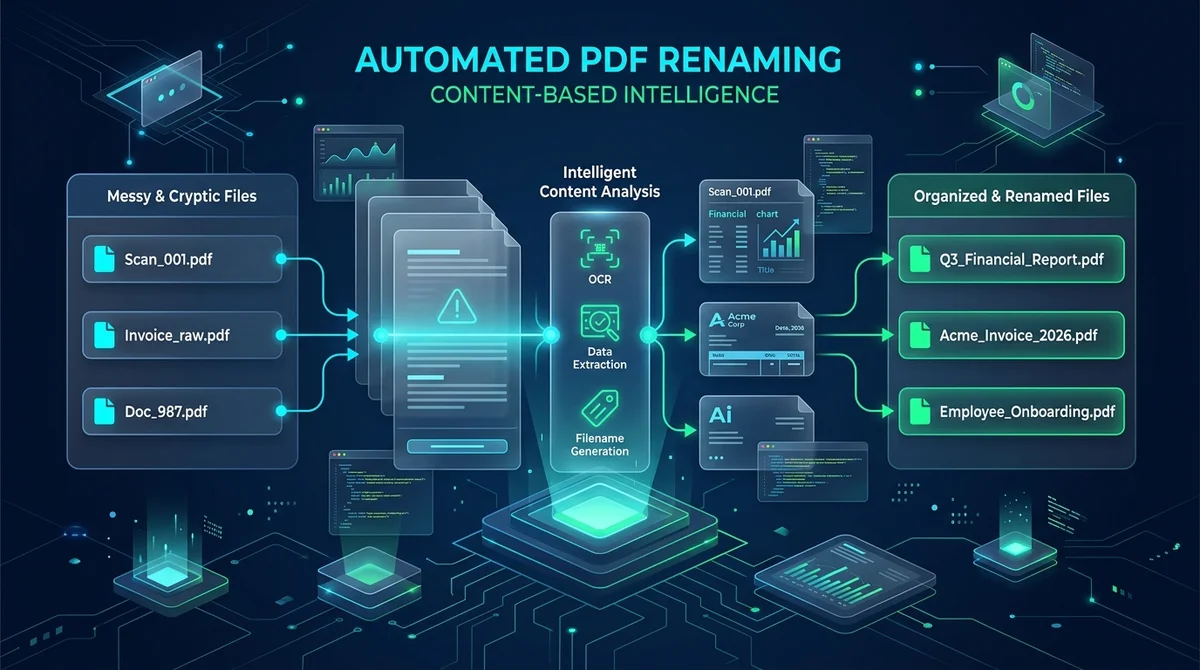
To auto rename PDF files online for free based on their content, you extract the primary heading from the first page text stream or read the internal ISO 32000 Title metadata tag. Using the AZ2PDF Auto Rename PDF tool, you can automatically convert confusing scanner names like Scan_001.pdf into clean, readable filenames in seconds with zero quality loss.
- Automated content detection: The system inspects document title tags and first-page heading text to formulate descriptive, standardized filenames automatically.
- Eliminate cryptic scan filenames: Turn confusing camera, multi-function printer, and scanner outputs into organized records without opening every file manually.
- 100 percent lossless document handling: The renaming workflow preserves your original PDF binary stream exactly, keeping fonts, hyperlinks, and images completely untouched.
- Free with in-memory privacy: Process files directly in secure server memory with zero fees, no account requirements, no watermarks, and automatic data purging within 5 minutes.
The cryptic filename problem: Why manual renaming wastes hours
If you regularly work with digital documents, your Downloads folder probably looks like a chaotic digital warehouse. Modern office equipment and web portals continuously generate PDF files with generic, unhelpful filenames:
- Office photocopiers and desktop scanners spit out default labels like Scan_20260924_001.pdf, DOC00192.pdf, or SKM_C250i26092410150.pdf.
- Banking portals, utility providers, and SaaS platforms export billing statements with cryptic internal database identifiers like stmt_download_998124.pdf or inv_print_export.pdf.
- Email attachments often arrive with ambiguous labels like Agreement_final_v2.pdf, Contract(1).pdf, or simply Document.pdf.
Trying to find a specific vendor invoice or client contract among dozens of mysteriously named files requires opening each document one by one, reading the header, copying the title, and manually typing a new filename into your operating system. For accounting departments, legal assistants, researchers, and small business owners processing dozens of files weekly, this manual chore consumes valuable hours and invites filing mistakes.
Automated content-based renaming eliminates this friction entirely by teaching software to read document titles and rename files automatically.
Bring order to messy download folders with the AZ2PDF Auto Rename tool. It inspects extracted text patterns, invoice dates, and metadata titles to rename hundreds of files systematically in a single batch.
Bring order to messy download folders with the AZ2PDF Auto Rename tool. It inspects extracted text patterns, invoice dates, and metadata titles to rename hundreds of files systematically in a single batch.
How content-based auto renaming works under the hood
Unlike simple bulk renaming tools that merely append incremental numbers (such as File_1, File_2, File_3), intelligent auto renaming inspects what is actually written inside the document.
When a PDF file is opened by an automated processing pipeline, the system examines the file structure following the international ISO 32000 standard. The objective is to identify the true semantic identity of the document: the primary title, the subject, the issuing company, or the document category.
Once this information is extracted, the engine cleanses the string to ensure it adheres to operating system filename requirements, replaces confusing characters with neat separators, and assigns a polished, human-readable name to the file.
Because this process focuses solely on identifying document labels, it does not alter, convert, or compress your document layout. Your original PDF content remains 100 percent identical, preserving vector typography, clickable hyperlinks, and embedded images.
To organize and enhance all aspects of your document workflows, you can access the complete suite of free online PDF tools on AZ2PDF directly inside your web browser.
Metadata title inspection versus first-page text extraction
A sophisticated renaming engine utilizes a two-tier inspection strategy to guarantee accurate results across different kinds of PDF files:
- Tier 1: Document Information Dictionary (/Info Title): The engine first reads the internal PDF trailer and catalog to check the /Title property. When documents are exported properly from software like Word, InDesign, or Google Docs, the authoring application frequently embeds the official document title directly into this dictionary. If a valid, non-generic title exists, the engine adopts it immediately.
- Tier 2: First-page text stream parsing: Many PDFs, especially scanned papers or raw billing exports, have empty or generic metadata dictionaries (such as "Microsoft Word - Document1"). When metadata is missing or unhelpful, the engine extracts the raw text stream from page one. It locates the prominent top-level heading, company name, or document header (such as "Q3 Financial Performance Report" or "Acme Corporation Tax Invoice") and uses that text as the new file label.
This dual approach ensures that whether your file was created by modern design software or exported from a cloud billing system, the tool identifies a meaningful name.
How to auto rename PDF files online in 3 simple steps
Renaming your documents automatically does not require installing desktop software, writing Python scripts, or purchasing commercial PDF suites. With the specialized AZ2PDF Auto Rename PDF tool, the workflow is fast and straightforward:
- Upload your PDF document: Drag and drop your unsorted PDF into the upload box, or click to browse files from your computer or smartphone.
- Let the engine analyze your document: AZ2PDF instantly examines the internal metadata dictionary and parses the first page text content in server memory.
- Download your newly renamed file: The system generates a clean, descriptive filename (such as "AZ2PDF - Commercial Lease Agreement.pdf") and initiates your download automatically.
The service is completely free to use, requires no registration, enforces no file count restrictions, and never stamps advertising watermarks onto your documents.
When processing scanned mailroom bundles, you can combine this with the ability to automatically split batch scans before renaming so every single invoice is partitioned and labeled in one automated flow.
Filesystem safety: Sanitizing characters and preventing errors
Extracting a headline directly from a PDF page and saving it as a filename requires strict string sanitization. Operating systems like Windows, macOS, and Linux maintain strict rules regarding which characters are permitted in filenames:
- Forbidden reserved characters: Characters like forward slashes (/), backslashes (\), colons (:), asterisks (*), question marks (?), quotation marks ("), angle brackets (< >), and pipe symbols (|) are illegal on Windows filesystems or used as directory path separators. An intelligent renaming tool filters these characters out to prevent file save failures.
- Path traversal protection: In web and server environments, unchecked strings containing double dots (..) could trigger security vulnerabilities. Sanitization strips these patterns completely.
- Length truncation: While document titles can span multiple lines, operating systems impose a 255-character path limit. The renaming engine cleanly truncates extracted phrases to safe, concise limits without cutting off important words awkwardly.
- Space and delimiter normalization: Multiple consecutive spaces, underscores, or punctuation marks are collapsed into clean, unified separators for optimal cross-platform compatibility.
When processing scanned mailroom bundles, you can combine this with the ability to automatically split batch scans before renaming so every single invoice is partitioned and labeled in one automated flow.
High-value scenarios: Invoices, legal contracts, and scanned records
Automated PDF renaming delivers tangible productivity gains across everyday business and administrative routines:
- Accounts payable and billing archives: Convert raw vendor receipts and downloaded bank statements into descriptive files like "Invoice_VendorName_2026.pdf" so your accounting team can search records effortlessly during tax season.
- Office scanner processing: Take bulk batches of paper documents digitized by multi-function office copiers and replace generic numerical labels with the actual title of each memorandum, report, or intake form.
- Legal discovery and case management: Organize evidentiary exhibits, depositions, and filed briefs into clear, readable filenames that align with court filing standards.
- Academic research and student notes: Rename scientific journal preprints, lecture handouts, and syllabus documents according to their research paper titles rather than arbitrary download hashes.
Automate administrative filing tasks effortlessly through the AZ2PDF batch document automation toolkit, where client-side batch processing guarantees fast turnaround without file leakage.
Troubleshooting: What to do when a PDF has no detectable text
If you run a document through an automated renaming tool and the resulting filename remains generic (such as "AZ2PDF - Document.pdf"), review these common causes and solutions:
- Scanned paper PDFs without an OCR text layer: If your document is a photograph or physical scan consisting only of flat pixels, the PDF contains no digital text characters for the parser to read. To resolve this, run the document through our OCR PDF tool first to create a searchable text layer, then use Auto Rename to generate your filename.
- Password-encrypted files: Documents protected with viewing or editing passwords restrict external parsers from reading internal text streams. Remove the password using an authorized password removal tool before renaming.
- Decorative graphical titles: Some graphic brochures and marketing flyers convert title headings into pure vector curves or embedded artwork rather than selectable font characters. In these cases, you can use our Edit Metadata tool to manually assign a custom Title tag in seconds.
Frequently asked questions
Find answers to common questions about automated PDF renaming, document security, and file management.
Automate administrative filing tasks effortlessly through the AZ2PDF batch document automation toolkit, where client-side batch processing guarantees fast turnaround without file leakage.
❓ Frequently asked questions
AZ2PDF uses a two-step detection pipeline. It first checks the internal ISO 32000 Document Information Dictionary for an existing Title tag. If that is blank or generic, it parses the first page of text to identify the prominent title heading, cleans the text of illegal characters, and generates a structured, readable filename.
Related articles in this topic
Deep dive into related document organization and page manipulation workflows.
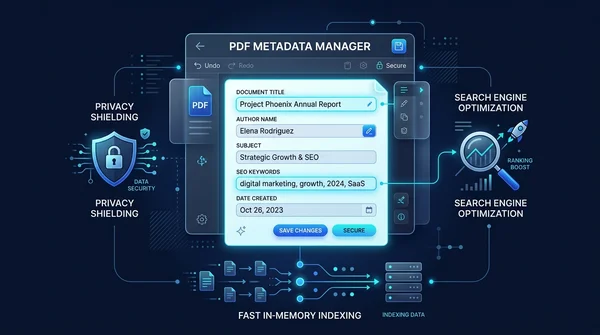
How to edit PDF metadata online for free (change title, author, and properties)
Learn how to edit PDF metadata online for free. Update document title, author, subject, and search keywords to improve SEO, professional branding, and privacy.

How to decompress PDF streams online for free (unpack raw code and FlateDecode)
Learn how to decompress PDF streams online for free to inspect raw PostScript operators, unpack FlateDecode filters, and debug PDF files with zero software.

How to compress a PDF without losing quality (free and fast)
Learn how to compress PDF file sizes by up to 85% for email and web uploads without blurry text or pixelated images. Fast, free, and 100% private in your browser.
How to flatten a PDF form and annotations permanently
Learn how to flatten PDF form fields, checkmarks, signatures, and annotations into permanent print layers. Prevent tampering and ensure 100% print accuracy for free.

How to verify a PDF digital signature for free (no Acrobat required)
Learn how to verify digital signatures in PDF files for free. Check cryptographic integrity, signer identity, certificate trust chains, and tamper status without Adobe Acrobat.
How to convert PDF to text online for free (clean TXT extraction)
Learn how to extract unformatted plain text from PDF documents online for free. Convert multi-column pages into clean UTF-8 TXT files for AI, coding, and fast copying.