How to scale PDF pages online to standard paper sizes (free and sharp)
Quick summary
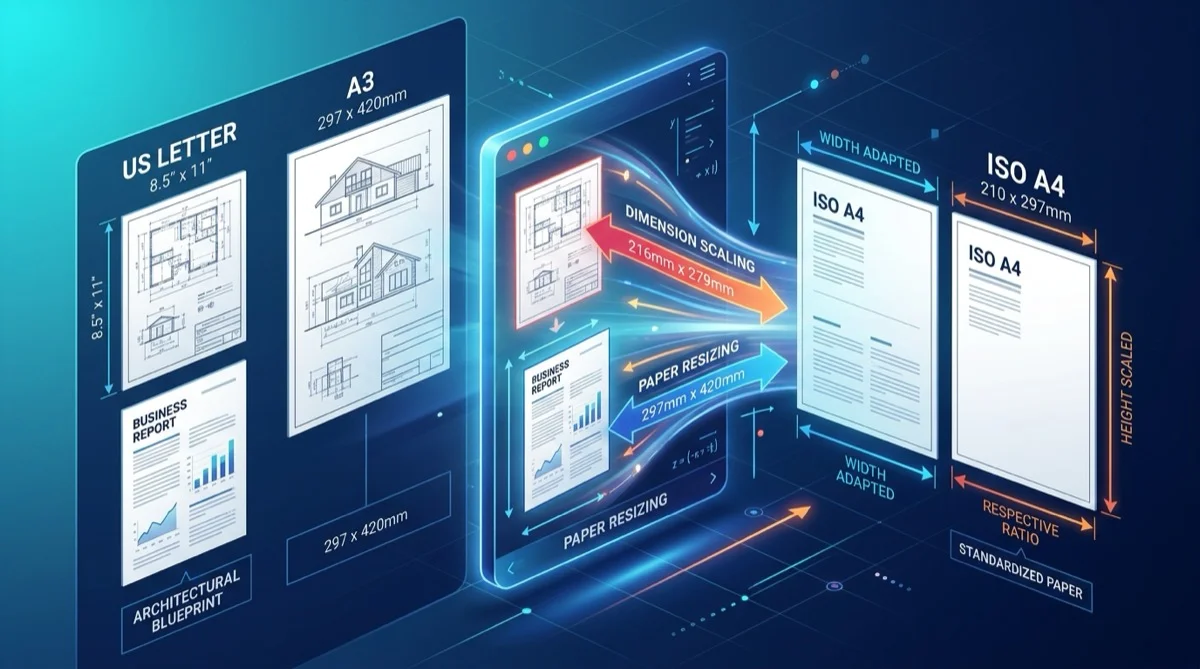
Scaling a PDF alters its physical coordinate bounding box (MediaBox) and resizes visible content proportionally to match standard paper formats like ISO A4, US Letter, or A3. Using the free in-browser engine at AZ2PDF, vector typography, CAD schematics, and text glyphs remain mathematically sharp at every scale, without data retention or software fees.
- Proportional vector scaling: Text and geometric diagrams stay razor-sharp because vector coordinate math is preserved rather than rasterized into pixels.
- Fixes printer margin cut-offs: Eliminates clipped headers, footers, and signatures caused by physical printer non-printable edge margins or mismatched paper sizes.
- Universal standard conversion: Easily converts between North American formats like US Letter and international ISO 216 formats like A4, A3, and A5.
- 100 percent free and private: Operates with ephemeral in-memory processing, no subscription paywalls, no file watermarks, and zero permanent server storage.
Why PDF page dimensions matter for printing and digital distribution
The Portable Document Format (PDF) was engineered around a core promise: what you see on your screen will look identical on every other device in the world. When an author exports a document, the application locks down precise physical page boundaries. Whether viewed on a desktop monitor, a smartphone, or an office workstation, each line of text and graphic logo remains anchored to exact spatial coordinates.
However, this absolute rigidity introduces a major challenge when documents cross regional borders or transition from digital screens to physical paper. The world does not share a single standard paper size. While North America relies on US Letter (8.5 by 11 inches) and US Legal (8.5 by 14 inches), the remaining 95 percent of the global population follows the international ISO 216 standard, centered on A4 (210 by 297 millimeters).
When you send an unscaled US Letter document to an international client in Europe, Asia, or South America, their office printer attempts to force the file onto an A4 sheet. Because US Letter is wider than A4 by nearly 6 millimeters, paragraphs placed near the side margins get clipped off. Similarly, footers containing critical legal disclaimers, page numbering, or signature blocks often disappear into the non-printable mechanical dead zone of the printer.
Beyond international office correspondence, page dimension mismatches disrupt several widespread professional workflows:
- Large-format engineering downscaling: Architectural blueprints, civil schematics, and mechanical CAD plots are routinely drafted in massive formats like A1 (594 by 841 mm) or A2 (420 by 594 mm). Project managers and field engineers need to scale these drawings down to A3 or A4 for everyday job site review and standard office printing without losing vector sharpness.
- Harmonizing merged multi-source reports: When assembling a comprehensive corporate dossier by combining invoices from suppliers, contracts from legal counsel, and spreadsheets from finance, the merged PDF often contains a jarring patchwork of page sizes. Readers experience an erratic visual jump in zoom level on every new page.
- Compliance and official portal submissions: Government visa registries, patent offices, and university admissions databases frequently enforce strict page dimension limits, rejecting files that deviate from mandatory A4 or Letter specifications.
Using the free AZ2PDF Scale PDF tool, you can adjust the physical paper dimensions of any document in seconds, standardizing your files for flawless printing and universal global reading.
How proportional scaling preserves razor-sharp vector text and line art
A common fear when resizing documents is loss of clarity. Many users assume that scaling a PDF works like resizing a JPEG photo, where shrinking or enlarging creates pixelated text, fuzzy lines, or muddy diagrams. Fortunately, high-quality document scaling operates under completely different mathematical rules.
Under the international ISO 32000 standard, a native digital PDF is not an image made of pixels. It is an object-oriented vector blueprint. Text characters are stored as mathematical glyph outlines defined by cubic Bézier curves, while charts, geometric shapes, and floor plans are stored as vector drawing operators. These objects exist inside a continuous coordinate space measured in PostScript points, where 72 points equal exactly 1 inch (25.4 mm).
When you use AZ2PDF to scale a document, our engine executes three rigorous computational operations:
- MediaBox and bounding box recalculation: The engine modifies the mandatory
/MediaBoxdictionary entry for each page object, defining the target dimensions (such as 595.28 by 841.89 points for standard A4, or 612 by 792 points for US Letter). - Affine transformation matrix scaling: Instead of re-encoding or rasterizing objects, the engine applies a mathematical 2D transformation matrix (
[sx 0 0 sy tx ty] cm) to the page content stream. This resizes all vector paths, text glyphs, and line widths simultaneously and proportionally. - Aspect ratio preservation and auto-centering: Because ISO A-series paper has an aspect ratio of 1:1.414 (the square root of 2) while US Letter has an aspect ratio of 1:1.294, simple stretching would distort logos and make typography look squashed. Our engine fits the source content within the target boundary while maintaining its original aspect ratio, automatically centering the visual content and adding balanced, clean margins.
Because the underlying vector geometry remains untouched, you can zoom in to 800 percent magnification on a 4K display or print the file on a commercial 1200 DPI laser printer, and your text will remain as razor-sharp as the day it was created.
How to scale PDF pages to standard paper sizes in 3 simple steps
Standardizing your document dimensions takes less than thirty seconds with AZ2PDF free online PDF tools. The utility requires no software downloads, no account registration, and zero subscription fees. Here is the straightforward process:
Step 1: Upload your PDF document
Open the free Scale PDF tool in your preferred web browser on Mac, Windows, Linux, iOS, or Android. Drag and drop your file into the clean upload zone, or click the browse button to select a document from your computer or phone storage. Your file loads instantly without waiting in processing queues.
Step 2: Select your target page size
Choose the desired output format from the standardized dimension options. You can select ISO A4 for international submissions, US Letter for North American offices, US Legal for legal contracts, or A3 for expanded presentations. The engine automatically handles proportional scaling calculations and margin balancing behind the scenes.
Step 3: Download your standardized PDF
Click the Scale button. The engine transforms the page coordinate streams in high-speed volatile memory in just a few seconds. Click Download to save your newly resized PDF directly to your device, 100 percent free of promotional watermarks or page count restrictions.
If your document contains excessive white margins or uneven scan borders before or after resizing, you can easily crop PDF margins and trim borders.
Understanding paper standards: ISO A-series versus North American formats
To choose the correct target dimensions for your project, it helps to understand why the two dominant paper standards differ and where each is required across the globe.
1. The international ISO 216 standard (A4, A3, A5)
Adopted by virtually every nation outside North America, the ISO 216 standard is built on an elegant mathematical principle: an aspect ratio of 1 to the square root of 2 (approximately 1:1.4142). This unique geometric ratio means that when you cut an A-series sheet in half across its width, the two resulting smaller sheets possess the exact same aspect ratio as the parent sheet:
- A3 (297 by 420 mm / 11.69 by 16.54 in): Widely used for architectural drawings, double-page spreads, engineering charts, and office presentation handouts.
- A4 (210 by 297 mm / 8.27 by 11.69 in): The undisputed global standard for commercial contracts, official correspondence, academic dissertations, and everyday business reports.
- A5 (148 by 210 mm / 5.83 by 8.27 in): Ideal for pocket reference guides, product manuals, booklets, and flyers.
Because the ratio is constant, scaling an A3 drawing down to A4 reduces each dimension by a factor of 0.7071 (a 50 percent area reduction) with zero distortion and zero wasted margins.
2. North American loose formats (US Letter, Legal, Tabloid)
The United States, Canada, and parts of Mexico rely on traditional imperial paper sizes that do not share a single geometric aspect ratio:
- US Letter (8.5 by 11.0 in / 215.9 by 279.4 mm): The standard sheet for American office printing, invoices, and school assignments. It is shorter and wider than A4.
- US Legal (8.5 by 14.0 in / 215.9 by 355.6 mm): Primarily used for North American court filings, real estate agreements, and corporate bylaws.
- US Tabloid / Ledger (11.0 by 17.0 in / 279.4 by 431.8 mm): Equivalent in role to ISO A3 for large spreadsheets and drawings.
Because US Letter is 5.9 mm wider than A4 but 17.6 mm shorter, documents created in one standard cannot be printed on the other without active dimension scaling. Failing to rescale will result in clipped margins or uneven borders.
Everyday scenarios where page scaling solves critical workflow problems
Page dimension scaling is an essential tool in any digital document toolkit. Here are four common professional scenarios where rescaling saves valuable time:
1. Eliminating printer margin cut-offs and hardware feed clipping
Almost all office laser printers and home inkjets feature a mechanical paper handling mechanism with rollers that grip the edges of the sheet. As a result, the printer hardware imposes a non-printable edge border of 3 to 5 mm where the print heads or laser drums cannot deposit ink. If a PDF has content positioned close to the edge, or if a wide US Letter file is sent to an A4 printer, headers, page numbers, and footers get cropped off. Scaling the page down slightly to fit within the printable area guarantees that all text appears cleanly on the final physical printout.
2. Converting large CAD schematics for desktop office review
Architects, electrical engineers, and construction foremen frequently receive schematic plans drafted in large A1 or A2 formats. Reviewing these files on a job site using a standard A4 desktop printer normally requires awkward multi-sheet tiling that has to be taped together. By scaling the file down to A4 or A3 with proportional vector preservation, team members can print crisp, fully readable single-sheet reference drafts in seconds.
3. Standardizing page sizes in merged corporate reports
When compiling quarterly business dossiers, annual reports, or legal discovery binders using PDF document management tools, source files often originate from multiple departments. A report might combine an A4 text briefing, a US Letter invoice from an American vendor, and a wide spreadsheet page. Scaling all individual documents to a uniform A4 or Letter standard before or after merging creates a clean, cohesive document that displays smoothly in any PDF viewer.
4. Preparing presentation slides for multi-page handout printing
Widescreen 16:9 presentation slides leave massive empty white bands when printed on vertical paper. By adjusting the slide dimensions or combining them with multi-page N-Up layout tools, you can impose multiple slides per physical sheet, reducing paper consumption and producing professional meeting handouts.
Scale versus crop versus compress: Choosing the correct document tool
Because document management tools often share related terminology, users occasionally confuse scaling with cropping or compression. Here is a clear breakdown to help you pick the right tool for your immediate goal:
1. Scale PDF (Dimension transformation)
What it does: Modifies the physical paper format of the page (such as converting US Letter to A4, or A3 to A4) while preserving all visible text, images, and logos proportionally within the new dimensions.
When to use: When you need to resolve paper size incompatibilities, prevent printer edge cut-offs, or unify mixed-size documents.
2. Crop PDF (Viewport framing)
What it does: Trims away unwanted outer margins, black scanner edges, or commercial printer bleed marks by adjusting the CropBox coordinate boundaries. It does not shrink or enlarge internal text.
When to use: When you want to eliminate distracting whitespace for comfortable reading on an iPad or Kindle, or when cutting a 4x6 inch shipping label out of a full-size sheet.
3. Compress PDF (Byte weight reduction)
What it does: Reduces digital file size in megabytes by downsampling embedded raster photographs, removing redundant metadata, and subsetting fonts. It leaves the physical paper dimensions completely unchanged.
When to use: When your file is too heavy to attach to an email (exceeding 20MB or 25MB limits) or rejected by an online application portal.
Privacy first: Why in-memory processing protects confidential files
PDF documents frequently contain highly confidential corporate and personal data: proprietary CAD blueprints, patient medical records, executive compensation contracts, and sensitive financial audits.
Many legacy web conversion portals monetize user traffic by storing uploaded documents on permanent hard disk drives, harvesting document contents for commercial marketing profiles, or leaving files vulnerable on public cloud buckets. For privacy-conscious professionals and enterprise organizations, that model introduces unacceptably high compliance and security liabilities.
AZ2PDF operates under a rigorous privacy-first engineering architecture:
- Ephemeral in-memory streams: When you upload a document to our Scale PDF tool, the file streams directly into isolated volatile server RAM. Files are never written to permanent hard drives, relational databases, or public storage volumes.
- Automated five-minute purge daemon: A dedicated server background daemon continuously monitors active memory allocations, permanently wiping all session traces within five minutes of completion.
- Zero AI training and zero indexing: Your documents are never scanned, analyzed, shared with third parties, or used to train artificial intelligence models. Your intellectual property remains exclusively yours.
- 100 percent free with no hidden paywalls: All scaling tools on AZ2PDF are completely free to use. There are no surprise subscription charges, daily file quotas, or forced account registrations.
Quick fixes for common PDF page scaling problems
If you encounter unexpected results when adjusting your document dimensions, these straightforward solutions resolve the most common issues:
1. Embedded photographs look slightly softer after enlarging to A3 or A2
While vector text and geometric line art remain mathematically sharp at any size, embedded raster photos have a fixed pixel grid. If an original document contained a 150 DPI photo on an A5 sheet and you enlarge that document to A3 (doubling its physical dimensions), the effective resolution of the photo drops to 75 DPI. For documents that will be enlarged significantly, always ensure source photos are scanned or imported at 300 DPI or higher.
2. Extra white bands appear on the top and bottom of the page
This is expected behavior when converting between formats with different aspect ratios, such as US Letter (1:1.294) and ISO A4 (1:1.414). Our engine deliberately adds balanced white margins on the sides or top to prevent your content from being stretched or distorted. If you want to eliminate outer margins entirely, you can trim the whitespace using our free Crop PDF tool.
3. The tool displays an error when uploading an encrypted file
If a PDF is protected with an open password that encrypts its internal binary streams, conversion engines cannot parse the document coordinates without authorization. Use the AZ2PDF Unlock PDF tool to decrypt your file with the valid password first, and then apply page scaling.
Standardize paper dimensions and streamline printing workflows with the AZ2PDF free online PDF platform, where ephemeral processing guarantees zero data retention.
Frequently asked questions
Is the Scale PDF tool completely free to use on AZ2PDF?
Yes. The AZ2PDF Scale PDF tool is 100 percent free with no hidden subscriptions, trial limits, watermarks, or account registration requirements. You can resize single documents or multi-page technical reports without paying software fees.
Will scaling down an A3 blueprint to A4 make the text blurry?
No. In a native digital PDF, text and line art are stored as mathematical vector glyphs and Bézier curves. When downscaling from A3 to A4, the coordinate points are transformed proportionally, meaning text remains razor-sharp at 100 percent vector fidelity. Embedded raster photos will also look sharper because their effective dots per inch (DPI) density increases.
Why does my printer cut off text when printing US Letter files on A4 paper?
US Letter (8.5 x 11 inches or 215.9 x 279.4 mm) is wider than ISO A4 (8.27 x 11.69 inches or 210 x 297 mm) by approximately 5.9 mm. Furthermore, physical desktop printers require 3mm to 5mm hardware margin borders to feed paper. When you print a US Letter document on A4 paper without pre-scaling, the outer edges of wide content get clipped off. Scaling the document to standard A4 before printing completely eliminates this issue.
Does scaling a PDF distort the aspect ratio of the content?
No. The scaling engine uses proportional dimension fitting. Because ISO A-series has a 1:1.414 aspect ratio while US Letter has a 1:1.294 aspect ratio, the engine scales the page content uniformly to fit inside the target boundary box, adding balanced white margins on the sides rather than stretching or squeezing text and illustrations.
Can I scale a password-protected PDF document?
If the PDF is encrypted with an open password, the document structure cannot be read by conversion engines until it is unlocked. You should first unlock the file using the authorized password on the AZ2PDF Unlock PDF tool, and then run the unlocked file through the Scale PDF tool.
Are my uploaded technical schematics and documents stored on your servers?
No. AZ2PDF processes all document transformations in volatile server RAM buffers. Files are never stored permanently on disk drives, never cataloged, and never used for machine learning models. An automated background cleanup daemon permanently purges all processing traces within 5 minutes.
❓ Frequently asked questions
Yes. The AZ2PDF Scale PDF tool is 100 percent free with no hidden subscriptions, trial limits, watermarks, or account registration requirements. You can resize single documents or multi-page technical reports without paying software fees.
Related articles in this topic
Deep dive into related document organization and page manipulation workflows.

How to crop PDF margins and trim page borders online for free
Learn how to crop PDF margins and trim unwanted borders online for free. Adjust page boundaries for Kindle, shipping labels, and academic papers with zero quality loss.
How to convert multi-page PDF to a single continuous page (free online tool)
Convert multi-page PDF documents into one continuous vertical scrolling page. Remove artificial page breaks, preserve vector text quality, and process files 100% free in your browser.
How to create a PDF booklet for printing (free double-sided imposition)
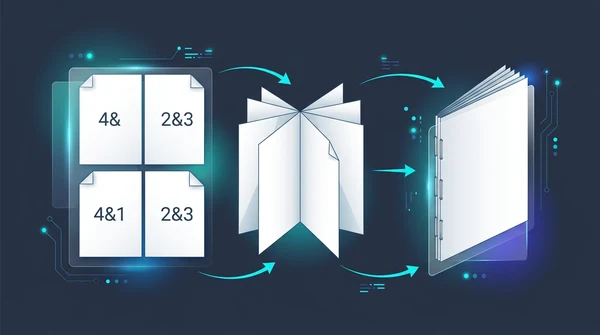
Learn how to turn any PDF into a foldable, double-sided booklet for printing. Reorder pages for saddle-stitch binding without paying for expensive software.

How to split PDF for poster printing (free online tile guide)
Learn how to split large PDF pages into printable 2x2 tiles for poster printing on regular A4 or Letter printers. 100 percent free without Adobe Acrobat.

How to merge PDF files into one document online (free and secure)
Learn how to combine multiple PDF files into one organized document online without Adobe Acrobat. Fast, free, and secure with zero quality loss.
How to split PDF pages into separate documents (free and secure)
Learn how to split PDF files into separate documents or extract specific page ranges online without Adobe Acrobat. Fast, free, and completely private.